Warehouse Quality Report OCR
API Description
Objective
The Warehouse Quality Report OCR API extracts data from warehouse quality report documents using Optical Character Recognition (OCR) technology and returns the information in JSON format.
| Input | Output |
|---|---|
| The warehouse quality report image | Structured data including depositor details, commodity information, warehouse details, testing information, and receipt details. The complete list of output fields is available in the Success Response Details section |
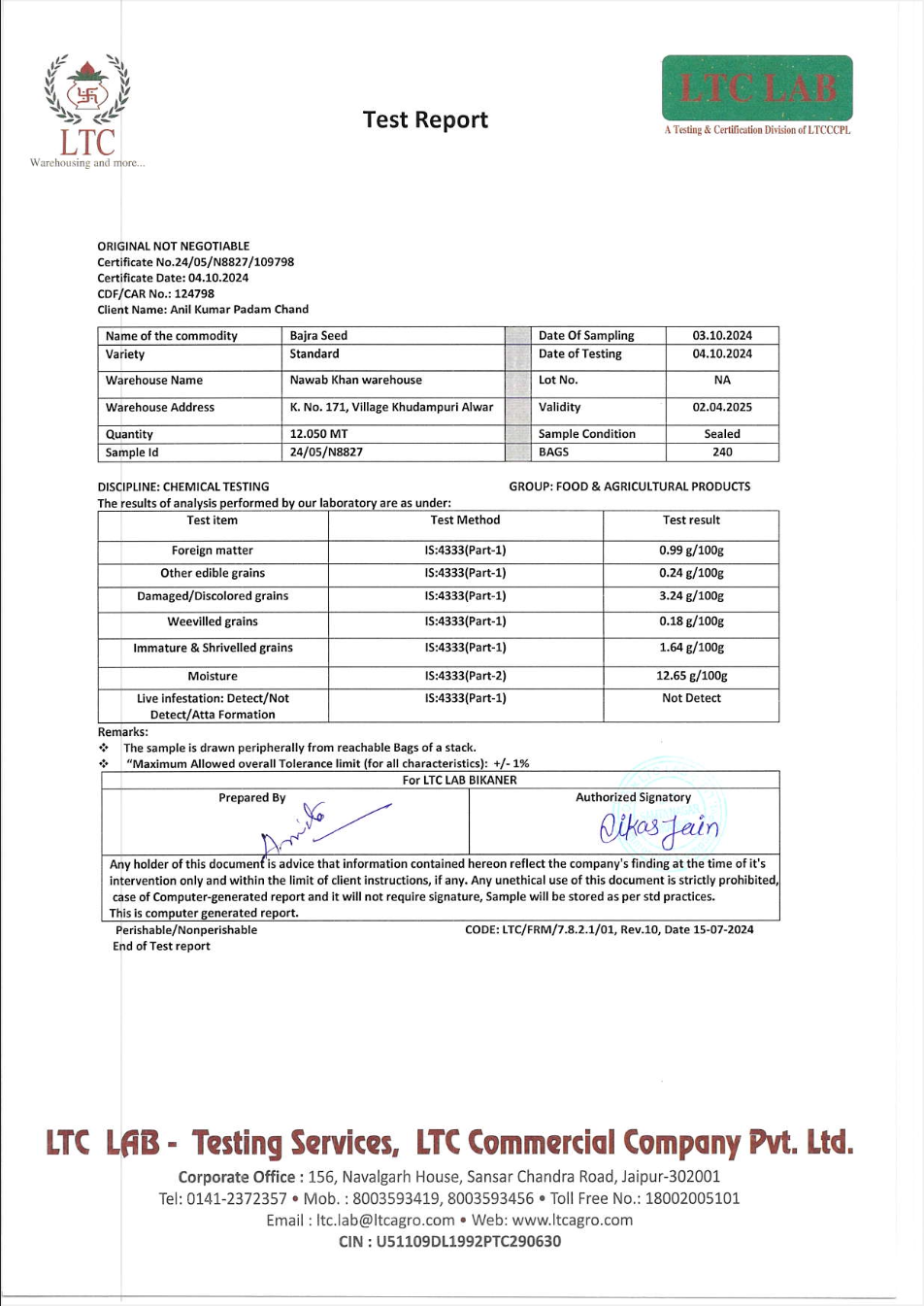
A Warehouse Quality Report is a document that contains quality assessment information for commodities stored in a warehouse. This report includes details about the depositor, commodity specifications, warehouse information, and quality testing results.
API URL
https://ind-engine.thomas.hyperverge.co/v1/readWHQualityReport
API Endpoint
readWHQualityReport
Overview
The Warehouse Quality Report OCR API is RESTful and uses standard HTTP verbs and status codes. The responses are in JSON format and you should send all data in JSON format through a POST request.
Authentication
You need a unique pair of application ID ( appId ) and application key (appKey) from HyperVerge to verify your identity for accessing the API.
API Request Details
Method - POST
Headers
| Parameter | Mandatory or Optional | Description | Valid Values |
|---|---|---|---|
| content-type | Mandatory | This parameter defines the media type for the request payload. | application/json |
| appId | Mandatory | Application ID shared by HyperVerge | N/A. This is a unique value. |
| appKey | Mandatory | Application Key shared by HyperVerge | N/A. This is a unique value. |
| transactionId | Mandatory | Unique transaction identifier for tracking | N/A. This should be a unique value. |
Input
The following table provides the details of the parameters required for the Warehouse Quality Report OCR API's request body:
| Parameter | Mandatory or Optional | Description | Allowed Values | Default Value |
|---|---|---|---|---|
image | Mandatory | The warehouse quality report image to be processed for OCR extraction | The file format can be JPG, JPEG, PNG, or PDF | Not Applicable |
Request
The following code snippet demonstrates a standard curl request for the Warehouse Quality Report OCR API:
curl --location --request POST 'https://ind-engine.thomas.hyperverge.co/v1/readWHQualityReport' \
--header 'Content-Type: application/json' \
--header 'appId: <Enter_the_HyperVerge_appId>' \
--header 'appKey: <Enter_the_HyperVerge_appKey>' \
--header 'transactionId: <Enter_the_Transaction_ID>' \
--data '{
    "image": "<Warehouse_Quality_Report_Image>"
}'
Document Sample
The following is a Warehouse Quality Report:
Success Response
The following code snippet demonstrates a success response from the Warehouse Quality Report OCR API:
{
    "status": "success",
    "statusCode": 200,
    "result": {
        "details": [
            {
                "fieldsExtracted": {
                    "depositorName": {
                        "value": "<Depositor_Name>"
                    },
                    "commodityName": {
                        "value": "<Commodity_Name>"
                    },
                    "commodityVariety": {
                        "value": "<Commodity_Variety>"
                    },
                    "warehouseName": {
                        "value": "<Warehouse_Name>"
                    },
                    "warehouseAddress": {
                        "value": "<Warehouse_Address>"
                    },
                    "warehouseDistrict": {
                        "value": "<Warehouse_District>"
                    },
                    "warehouseState": {
                        "value": "<Warehouse_State>"
                    },
                    "numberOfBags": {
                        "value": "<Number_Of_Bags>"
                    },
                    "receiptNumber": {
                        "value": "<Receipt_Number>"
                    },
                    "CARNumber": {
                        "value": "<CAR_Number>"
                    },
                    "SRNumber": {
                        "value": "<SR_Number>"
                    },
                    "dateOfCertificate": {
                        "value": "<Date_of_Certificate>"
                    },
                    "dateOfTesting": {
                        "value": "<Date_Of_Testing>"
                    },
                    "digitallySignedBy": {
                        "value": "<Digitally_Signed_By>"
                    },
                    "digitalSignatureDate": {
                        "value": "<Digital_Signature_Date>"
                    }
                },
                "type": "Warehouse Quality Report"
            }
        ]
    },
    "metadata": {
        "requestId": "<Request_ID>",
        "transactionId": "<Transaction_ID>"
    }
}
Success Response Details
The following table outlines the details of the success response from the Warehouse Quality Report OCR API:
| Parameter | Type | Description |
|---|---|---|
| status | string | The status of the request |
| statusCode | integer | The status code of the response |
| result | object | The result object containing the extracted warehouse quality report details |
| details | array | The array containing the extracted document details |
| fieldsExtracted | object | The object containing all extracted fields from the warehouse quality report |
| depositorName | object | The name of the individual or entity who deposited the commodity for quality testing |
| commodityName | object | The name of the commodity that underwent quality testing |
| commodityVariety | object | The specific variety or type of the commodity tested |
| warehouseName | object | The name of the warehouse where the quality testing was conducted |
| warehouseAddress | object | The complete address of the warehouse facility |
| warehouseDistrict | object | The district where the warehouse is located |
| warehouseState | object | The state where the warehouse is located |
| numberOfBags | object | The total number of bags or packages of the commodity tested |
| receiptNumber | object | The unique receipt number assigned to the quality report |
| CARNumber | object | The CAR (Central Agricultural Repository) number associated with the quality report |
| SRNumber | object | The SR (Storage Receipt) number for the quality report |
| dateOfCertificate | object | The date when the quality certificate was issued, in DD-MMM-YYYY format |
| dateOfTesting | object | The date when the quality testing was conducted in, DD-MMM-YYYY format |
| digitallySignedBy | object | The name of the person who digitally signed the quality report |
| digitalSignatureDate | object | The date when the quality report was digitally signed , in DD-MMM-YYYY format |
| type | string | The type of document that was processed |
| metadata | object | The metadata object containing request tracking information |
| requestId | string | The unique identifier for the request |
| transactionId | string | The transaction identifier for tracking |
Error Responses
The following are some error responses from the API:
- No Image Input
- Image Size Exceeds Limit
- Document Not Detected
- Missing/Invalid Credentials
- Internal Server Error
- Service Unavailable
{
    "status": "failure",
    "statusCode": 400,
    "error": "API call requires one input image"
}
{
    "status": "failure",
    "statusCode": 400,
    "error": "Image size cannot be greater than 6MB"
}
{
    "status": "failure",
    "statusCode": 422,
    "error": "Document Not Detected"
}
{
    "message": "Missing/Invalid credentials",
    "statusCode": 401,
    "status": "failure"
}
{
    "message": "Internal Server Error",
    "statusCode": 500,
    "status": "failure"
}
{
    "message": "Service Unavailable",
    "statusCode": 503,
    "status": "failure"
}
Failure and Error Response Details
A failure or error response from the module contains a failure status, with a relevant status code and error message.
The following table lists all error responses:
| Status Code | Error | Error Description |
|---|---|---|
| 400 | API call requires one input image | The request is missing the required image input parameter |
| 400 | Image size cannot be greater than 6MB | The request contains an image file that exceeds the maximum allowed size of 6MB |
| 401 | Missing/Invalid credentials | The request is either missing the mandatory appId and appKey combination or has invalid values |
| 422 | Document Not Detected | The request contains an image where no warehouse quality report document could be identified or detected |
| 500 | Internal Server Error | The request has an internal server error. Please check the request headers or contact the HyperVerge team for investigation |
| 503 | Service Unavailable | The Warehouse Quality Report OCR service is currently unavailable. Please try again later or contact the HyperVerge team for investigation |
- If multiple images are sent to the server in the same call, only one of the images will be read. Hence it is advisable to only send one image per call.
- For PDF documents, if the document has multiple pages, only the first three pages will be processed.
- The API supports JPG, JPEG, PNG, and PDF file formats for input images.
- All extracted field values are returned as strings, even for numeric fields.
- Empty fields will be returned with empty string values.
- Date fields are returned in DD-MMM-YYYY format.